Rendering Basics with PyTorch3D
16-825 Learning for 3D: Assignment 1
Author: Benny Zhu (haozhenz)
Date: September 2026
Table of Contents
- 1. Practicing with Cameras (15 Points)
- 2. Practicing with Meshes (10 Points)
- 3. Re-texturing a Mesh (10 points)
- 4. Camera Transformations (10 points)
- 5. Rendering Generic 3D Representations (45 Points)
- (Extra Credit) 6. Do Something Fun (10 points)
- (Extra Credit) 7. Sampling Points on Meshes (10 points)


2.2 Constructing a Cube (5 points)
python -m starter.Q2_2

The cube mesh has 8 vertices and 12 faces.
3. Re-texturing a Mesh (10 points)
python -m starter.Q3

In this case, color1 = [0.7, 0.7, 0] and color2 = [0, 0, 0.7].
4. Camera Transformations (10 points)
python -m starter.Q4
python -m starter.Q4 --transform_id 1 --output_path images/textured_cow_1.jpg
python -m starter.Q4 --transform_id 2 --output_path images/textured_cow_2.jpg
python -m starter.Q4 --transform_id 3 --output_path images/textured_cow_3.jpg
python -m starter.Q4 --transform_id 4 --output_path images/textured_cow_4.jpg
Original render:

T1: The relative rotation $R_1$ rotates the camera 90° about its Z-axis (the optical axis) with no translation. This causes the cow to appear rotated 90° within the image plane.
$$ R_1 = \begin{bmatrix} 0 & 1 & 0 \\ -1 & 0 & 0 \\ 0 & 0 & 1 \end{bmatrix}, \quad T_1 = \begin{bmatrix} 0 \\ 0 \\ 0 \end{bmatrix} $$

T2: No rotation is applied. The translation $T_2 = [0, 0, 3]$ moves the camera 3 units further along the Z-axis, making the cow appear smaller (further away).
$$ R_2 = \begin{bmatrix} 1 & 0 & 0 \\ 0 & 1 & 0 \\ 0 & 0 & 1 \end{bmatrix}, \quad T_2 = \begin{bmatrix} 0 \\ 0 \\ 3 \end{bmatrix} $$

T3: No rotation is applied. The translation $T_3 = [0.5, -0.5, 0]$ shifts the camera in the X-Y plane, which moves the cow toward the bottom-left of the frame.
$$ R_3 = \begin{bmatrix} 1 & 0 & 0 \\ 0 & 1 & 0 \\ 0 & 0 & 1 \end{bmatrix}, \quad T_3 = \begin{bmatrix} 0.5 \\ -0.5 \\ 0 \end{bmatrix} $$

T4: The relative rotation $R_4$ rotates the camera 90° about the Y-axis, giving us a side view of the cow. The translation $T_4 = [-3, 0, 3]$ repositions the camera so the cow remains within the field of view.
$$ R_4 = \begin{bmatrix} 0 & 0 & 1 \\ 0 & 1 & 0 \\ -1 & 0 & 0 \end{bmatrix}, \quad T_4 = \begin{bmatrix} -3 \\ 0 \\ 3 \end{bmatrix} $$


5.2 Parametric Functions (10 + 5 points)
python -m starter.render_generic --render parametric --num_samples 1000
python -m starter.render_generic --render mobius --num_samples 1000
| Torus | Möbius Strip |
|---|---|
 |
 |
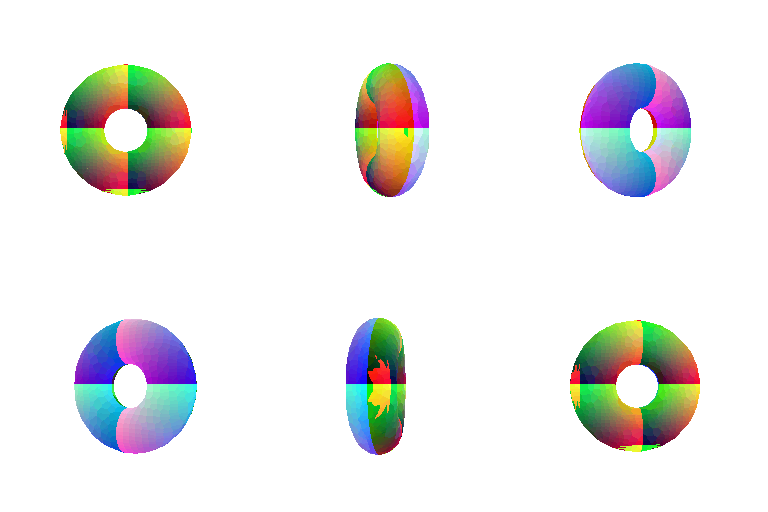
5.3 Implicit Surfaces (15 + 5 points)
python -m starter.Q5 --render implicit
python -m starter.Q5 --render heart
| Implicit Torus | Implicit Ellipsoid |
|---|---|
 |
 |
Mesh vs. Point Cloud Tradeoffs
| Mesh | Point Cloud | |
|---|---|---|
| Rendering Speed | Slow | Fast |
| Rendering Quality | High | Depend on the Density of the points |
| Ease of Use | Hard | Easy |
| Memory Usage | High | Low |
(Extra Credit) 6. Do Something Fun (10 points)
python -m starter.Q6

Render a dragon. The dataset was downloaded from Free3D, but unfortunately, it does not provide any information about the dataset.
(Extra Credit) 7. Sampling Points on Meshes (10 points)
python -m starter.Q7 --num_samples 10
python -m starter.Q7 --num_samples 100
python -m starter.Q7 --num_samples 1000
python -m starter.Q7 --num_samples 10000
| Original Mesh | 10 points | 100 points | 1,000 points | 10,000 points |
|---|---|---|---|---|
 |
 |
 |
 |
 |