16-825 Assignment 1: Rendering Basics with PyTorch3D
Results webpage — cameras, meshes, textures, point clouds, and implicit surfaces
1. Practicing with Cameras (15 points)
1.1 360-degree Renders (5 points)
I rendered the provided cow mesh from many viewpoints by sweeping the camera
azimuth from 0° to 360° using look_at_view_transform, then saved
the frames as a looping GIF.

1.2 Dolly Zoom (10 points)
To keep the subject roughly the same size while changing FOV, camera distance
satisfies distance ∝ 1 / tan(fov/2). As FOV increases the camera
moves closer; as FOV decreases it moves farther, producing the classic dolly-zoom
perspective warp on the ground plane.

2. Practicing with Meshes (10 points)
2.1 Tetrahedron (5 points)
I manually defined a tetrahedron with a triangular base and an apex above it. The mesh has 4 vertices and 4 triangular faces.

2.2 Cube (5 points)
The cube has 8 vertices. Each of the 6 square sides is split into 2 triangles, giving 12 triangular faces.

3. Re-texturing a Mesh (10 points)
I recolored the cow with a front-to-back gradient based on each vertex’s z-coordinate:
color1 = [0, 0, 1](blue) at the front (z_min)color2 = [1, 0, 0](red) at the back (z_max)
Intermediate vertices use
color = α·color2 + (1−α)·color1 with
α = (z − z_min) / (z_max − z_min).

4. Camera Transformations (10 points)
Starting from R0 = I and T0 = [0, 0, 3],
new extrinsics are
R = R_relative @ R0 and
T = R_relative @ T0 + T_relative.
transform1 — rotate about Z
R_relative is a −90° rotation about the camera’s Z (optical) axis;
T_relative = [0, 0, 0]. This rotates the image in-plane without
changing camera distance.


transform3 — move farther
R_relative = I, T_relative = [0, 0, 2], so final
T = [0, 0, 5]. The cow stays centered but appears smaller because
the camera is farther away.


transform4 — translate in the image plane
R_relative = I, T_relative = [0.5, −0.5, 0].
No rotation; an XY shift moves the cow off-center in the frame.


transform2 — side view (rotate about Y)
R_relative is a 90° rotation about Y to view the cow from the side.
After that rotation, R_relative @ T0 no longer places the
subject at a good viewing distance, so
T_relative = [−3, 0, 3] restores a reasonable camera translation.


5. Rendering Generic 3D Representations (45 points)
5.1 Point Clouds from RGB-D (10 points)
Using unproject_depth_image, I built point clouds from the two plant
RGB-D views and their union. Below is a 360° GIF with the three clouds
side-by-side (left → right: view 1, view 2, union). Single views are incomplete
from some angles; the union is more complete.

5.2 Parametric Functions (10 + 5 points)
A torus was sampled from its parametric equations
(R + r cos θ) cos φ,
(R + r cos θ) sin φ,
r sin θ
with R = 1, r = 0.4 so the hole is visible.

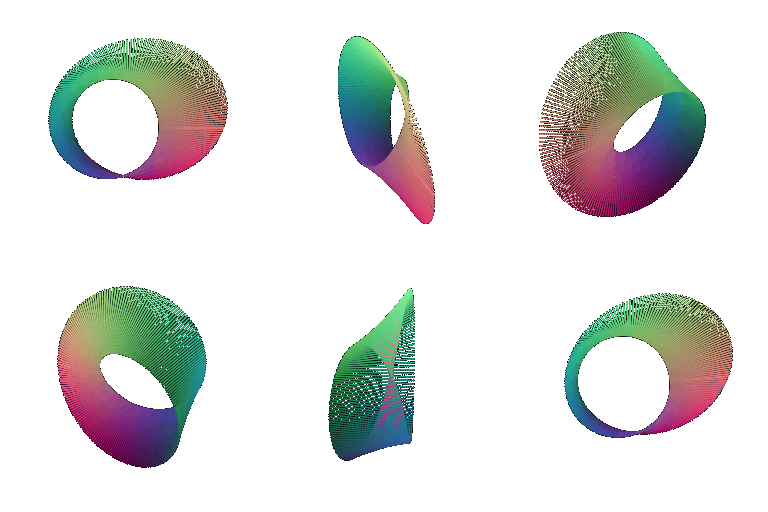
For the extra object (+5), I rendered a Möbius strip point cloud from its standard parametric equations.
5.3 Implicit Surfaces (15 + 5 points)
The same torus is defined implicitly as the zero level-set of
F(x,y,z) = (√(x²+y²) − R)² + z² − r²,
sampled on a voxel grid and converted to a mesh with marching cubes.

Mesh vs point cloud tradeoffs (5 points)
- Quality: Meshes give continuous surfaces and cleaner silhouettes/shading. Point clouds can look sparse or noisy unless densely sampled.
- Speed: A compact mesh is often faster to render than a very dense point cloud (e.g. RGB-D unions with hundreds of thousands of points).
- Memory: Point clouds scale with the number of points. Implicit meshes need a voxel grid up front, then store vertices/faces.
- Ease of use: Point clouds are easy to build from RGB-D or parametric sampling. Implicit meshes need a good equation plus marching cubes, but then behave like normal meshes.
- Topology: A mesh explicitly encodes the torus hole; in a point cloud the hole is only clear if sampling is dense enough.
For the extra implicit object (+5), I rendered a classic implicit heart surface.

6. Extra Credit: Do Something Fun (+10 points)
I built a body-centered cubic (BCC) unit cell as a point cloud: 8 corner atoms, 1 center atom, and rods along the body diagonals from the center to each corner (similar to a chemistry lattice model). Each atom is a parametrically sampled sphere; each rod is a thin sampled cylinder.

7. Extra Credit: Sampling Points on Meshes (+10 points)
I implemented stratified surface sampling on the cow mesh: (1) pick a face with probability proportional to area, (2) sample a uniform barycentric coordinate, (3) form the 3D point on that triangle. Below: original mesh next to 10, 100, 1000, and 10000 samples.
